

Amazon reprices constantly. A competitor drops 12% at 3am and recovers by morning. A product on your list hits your target for six hours and goes back up. Miss it, and you're paying full price — which is exactly what dynamic pricing algorithms are built to ensure.
This guide walks you through building a tracker that monitors Amazon on a schedule, stores price history with timestamps, and emails you when something drops past your threshold. No paid Twilio account needed. Just Python, BeautifulSoup, SQLite, and smtplib.
Run it on your laptop, a Raspberry Pi, or a cheap VPS. Libraries: requests, beautifulsoup4, lxml, schedule, smtplib (stdlib).
Before you start: the honest part about scraping Amazon
Amazon actively blocks scrapers. User-agent headers alone - the approach that worked five years ago - don't cut it in 2026. Amazon fingerprints requests by header pattern, request cadence, IP reputation, and browser behaviour. For a small watchlist (5–10 products), a current browser user-agent string and randomised delays will get you through most of the time. For anything larger - hundreds of ASINs, running for months - you need rotating residential proxies or a managed scraping API.
The 5 major challenges that make Amazon data scraping painful go well beyond headers: JavaScript rendering, CAPTCHA walls, Buy Box rotation, and geo-targeted pricing all compound at scale. We'll build the full working script. At the point where it breaks, we'll tell you why and what to do.
Step 1 - Set up your project
mkdir amazon-price-tracker
cd amazon-price-tracker
pip install requests beautifulsoup4 lxml schedule
Three files in the project folder:
amazon-price-tracker/
├── build_master.py      # Run once to create your initial price baseline
├── tracker.py           # Run on a schedule to check for drops
└── price_history.db     # Created automatically by the scripts
Step 2 - Build the master price list
This script visits each URL in your watchlist, scrapes the product name and current price, and saves them to SQLite. Run it once to establish your baseline.
# build_master.py

import requests
from bs4 import BeautifulSoup
from lxml import etree as et
import sqlite3
import time
import random

# --- Configuration ---

HEADER = {
    "User-Agent": (
        "Mozilla/5.0 (Macintosh; Intel Mac OS X 10_15_7) "
        "AppleWebKit/605.1.15 (KHTML, like Gecko) "
        "Version/17.6 Safari/605.1.15"
    ),
    "Accept": "text/html,application/xhtml+xml,application/xml;q=0.9,*/*;q=0.8",
    "Accept-Language": "en-US,en;q=0.9",
    "Accept-Encoding": "gzip, deflate, br",
}

WATCHLIST = [
    "https://www.amazon.in/Garmin-010-02064-00-Instinct-Monitoring-Graphite/dp/B07HYX9P88/",
    "https://www.amazon.in/Rockerz-370-Headphone-Bluetooth-Lightweight/dp/B0856HRTJG/",
    "https://www.amazon.in/Logitech-MK215-Wireless-Keyboard-Mouse/dp/B012MQS060/",
    "https://www.amazon.in/Logitech-G512-Mechanical-Keyboard-Black/dp/B07BVCSRXL/",
    "https://www.amazon.in/BenQ-inch-Bezel-Monitor-Built/dp/B073NTCT4R/",
]

# --- Database setup ---

def init_db():
    conn = sqlite3.connect("price_history.db")
    conn.execute("""
        CREATE TABLE IF NOT EXISTS products (
            url TEXT PRIMARY KEY,
            name TEXT
        )
    """)
    conn.execute("""
        CREATE TABLE IF NOT EXISTS prices (
            id INTEGER PRIMARY KEY AUTOINCREMENT,
            url TEXT,
            price INTEGER,
            checked_at TEXT DEFAULT (datetime('now')),
            FOREIGN KEY (url) REFERENCES products(url)
        )
    """)
    conn.commit()
    return conn

# --- Scrapers ---

def get_price(dom):
    """
    We use .a-offscreen — the machine-readable price Amazon renders
    for screen readers. It's more stable than .a-price-whole / .a-price-fraction,
    which are the visible split display elements.
    Amazon's DOM changes. If this starts returning None on products you
    know have prices, open the page, inspect the price element, and
    update this selector.
    """
    try:
        price = dom.xpath('//span[@class="a-offscreen"]/text()')[0]
        price = price.replace(",", "").replace("₹", "").replace(".00", "").strip()
        return int(price)
    except (IndexError, ValueError):
        return None

def get_name(dom):
    try:
        name = dom.xpath('//span[@id="productTitle"]/text()')
        return name[0].strip() if name else None
    except Exception:
        return None

# --- Main ---

conn = init_db()

for url in WATCHLIST:
    try:
        response = requests.get(url, headers=HEADER, timeout=10)
        soup = BeautifulSoup(response.content, "html.parser")
        dom = et.HTML(str(soup))

        price = get_price(dom)
        name = get_name(dom)

        if price and name:
            conn.execute(
                "INSERT OR REPLACE INTO products (url, name) VALUES (?, ?)",
                (url, name)
            )
            conn.execute(
                "INSERT INTO prices (url, price) VALUES (?, ?)",
                (url, price)
            )
            conn.commit()
            print(f"✓ {name[:60]} — ₹{price:,}")
        else:
            print(f"✗ Could not scrape: {url}")
            print("  Amazon may have blocked this request. See the anti-bot section below.")

    except Exception as e:
        print(f"✗ Error on {url}: {e}")

    time.sleep(random.uniform(3, 7))

conn.close()
print("\nBaseline saved. Run tracker.py to start monitoring.")
Run it:
python3 build_master.pyExpected output:
✓ Garmin Instinct Tactical GPS Watch — ₹24,990
✓ boAt Rockerz 370 Bluetooth Headphones — ₹1,299
...
Baseline saved. Run tracker.py to start monitoring.
Multiple ✗ Could not scrape lines means Amazon blocked the request. Jump to the anti-bot section before continuing.
Step 3 - Build the price tracker
This script reads your watchlist from the database, checks current prices against the baseline, and batches anything that dropped more than 10% into a single alert email.
# tracker.py

import requests
from bs4 import BeautifulSoup
from lxml import etree as et
import sqlite3
import smtplib
from email.mime.text import MIMEText
import time
import random
import schedule
from datetime import datetime

# --- Configuration ---

HEADER = {
    "User-Agent": (
        "Mozilla/5.0 (Macintosh; Intel Mac OS X 10_15_7) "
        "AppleWebKit/605.1.15 (KHTML, like Gecko) "
        "Version/17.6 Safari/605.1.15"
    ),
    "Accept": "text/html,application/xhtml+xml,application/xml;q=0.9,*/*;q=0.8",
    "Accept-Language": "en-US,en;q=0.9",
    "Accept-Encoding": "gzip, deflate, br",
}

ALERT_THRESHOLD = 10  # percent

# Email — uses Gmail App Password (see Step 4)
EMAIL_FROM    = "your_email@gmail.com"
EMAIL_TO      = "your_email@gmail.com"
EMAIL_PASSWORD = "your_app_password"
SMTP_HOST     = "smtp.gmail.com"
SMTP_PORT     = 587

# --- Database helpers ---

def get_watchlist(conn):
    return conn.execute("SELECT url, name FROM products").fetchall()

def get_baseline_price(conn, url):
    row = conn.execute(
        "SELECT price FROM prices WHERE url = ? ORDER BY id ASC LIMIT 1",
        (url,)
    ).fetchone()
    return row[0] if row else None

def save_price(conn, url, price):
    conn.execute(
        "INSERT INTO prices (url, price) VALUES (?, ?)",
        (url, price)
    )
    conn.commit()

# --- Scrapers ---

def get_price(dom):
    try:
        price = dom.xpath('//span[@class="a-offscreen"]/text()')[0]
        price = price.replace(",", "").replace("₹", "").replace(".00", "").strip()
        return int(price)
    except (IndexError, ValueError):
        return None

def get_name(dom):
    try:
        name = dom.xpath('//span[@id="productTitle"]/text()')
        return name[0].strip() if name else None
    except Exception:
        return None

# --- Alerts ---

def send_email_alert(drops):
    subject = f"Price drop: {len(drops)} product(s) on your watchlist"
    lines = []
    for name, url, old, new, pct in drops:
        lines.append(f"{name}")
        lines.append(f"  Was: ₹{old:,}  →  Now: ₹{new:,}  ({pct}% drop)")
        lines.append(f"  {url}")
        lines.append("")
    body = "\n".join(lines)

    msg = MIMEText(body)
    msg["Subject"] = subject
    msg["From"]    = EMAIL_FROM
    msg["To"]      = EMAIL_TO

    try:
        with smtplib.SMTP(SMTP_HOST, SMTP_PORT) as server:
            server.starttls()
            server.login(EMAIL_FROM, EMAIL_PASSWORD)
            server.send_message(msg)
        print(f"  → Alert sent to {EMAIL_TO}")
    except Exception as e:
        print(f"  → Email failed: {e}")


# Optional: Twilio SMS instead of email
# Uncomment and fill in credentials if you prefer SMS alerts.
#
# from twilio.rest import Client
# TWILIO_SID   = "your_account_sid"
# TWILIO_TOKEN = "your_auth_token"
# TWILIO_FROM  = "+1234567890"
# TWILIO_TO    = "+91XXXXXXXXXX"
#
# def send_sms_alert(drops):
#     client = Client(TWILIO_SID, TWILIO_TOKEN)
#     lines = [f"Price drop: {name} — ₹{new:,} ({pct}% off)\n{url}"
#              for name, url, old, new, pct in drops]
#     client.messages.create(body="\n\n".join(lines), from_=TWILIO_FROM, to=TWILIO_TO)


# --- Main check ---

def check_prices():
    print(f"\n[{datetime.now().strftime('%Y-%m-%d %H:%M')}] Checking prices...")
    conn  = sqlite3.connect("price_history.db")
    drops = []

    for url, name in get_watchlist(conn):
        try:
            response = requests.get(url, headers=HEADER, timeout=10)
            soup     = BeautifulSoup(response.content, "html.parser")
            dom      = et.HTML(str(soup))

            current = get_price(dom)

            if current is None:
                print(f"  ✗ {name[:50]} — scrape failed (blocked?)")
                time.sleep(random.uniform(3, 7))
                continue

            baseline = get_baseline_price(conn, url)
            save_price(conn, url, current)

            if baseline and current < baseline:
                pct    = round((baseline - current) * 100 / baseline)
                marker = f"↓ {pct}% drop" if pct > ALERT_THRESHOLD else f"↓ {pct}% (below threshold)"
                print(f"  {name[:50]} — ₹{current:,} (was ₹{baseline:,}) {marker}")
                if pct > ALERT_THRESHOLD:
                    drops.append((name, url, baseline, current, pct))
            else:
                print(f"  ✓ {name[:50]} — ₹{current:,}")

        except Exception as e:
            print(f"  ✗ Error: {e}")

        time.sleep(random.uniform(3, 7))

    if drops:
        send_email_alert(drops)
    else:
        print("  No significant drops this run.")

    conn.close()

# --- Scheduler ---

check_prices()  # Run immediately on start

schedule.every(1).hours.do(check_prices)

print("\nTracker running. Checking every hour. Ctrl+C to stop.")
while True:
    schedule.run_pending()
    time.sleep(60)
python3 tracker.pyStep 4 - Set up Gmail alerts
Gmail rejects plain password logins from scripts. You need an App Password:
- Google account → Security → 2-Step Verification (enable if off)
- Security → App Passwords
- Create one, name it "price tracker"
- Paste the 16-character password into
EMAIL_PASSWORDin tracker.py
All drops in a single run go into one email. No spam storm if five products drop simultaneously.
Step 5 - Test before you deploy
Don't wait for a real price drop to discover your email config is broken. Force one:
# test_alert.py
import sqlite3

conn = sqlite3.connect("price_history.db")
url  = conn.execute("SELECT url FROM products LIMIT 1").fetchone()[0]

# Inflate the baseline so the next check triggers a drop
conn.execute(
    "UPDATE prices SET price = 99999 WHERE url = ? AND id = (SELECT MIN(id) FROM prices WHERE url = ?)",
    (url, url)
)
conn.commit()
conn.close()

print("Done. Run tracker.py — you should get an alert on the first product.")
Run test_alert.py, then tracker.py. The email arrives within a minute if the config is right.
Where this breaks, and what to do about it
For a personal watchlist of 5–10 products, this script holds up. We've run versions of it internally for years. Three walls as you scale:
Volume triggers bot detection. A single user-agent and random delays handle a handful of requests per hour. At 50+ products, you'll hit CAPTCHA pages, 503s, and HTML with no price data. The fix is rotating residential proxies - each request exits from a different IP. Our guide on maintaining anonymity when scraping at scale covers IP rotation cadence, session management, and header randomisation. Hitting Cloudflare or similar WAFs on other sites? curl_cffi handles those without a full headless browser.
Amazon changes its HTML. The .a-offscreen selector is current as of this writing. Amazon redesigns pages without notice - plan for the selector to break a few times a year. When get_price() starts returning None on products you know have prices, open the page, inspect the price element, update your XPath. If you'd rather have a scraper that handles JavaScript rendering and DOM changes more gracefully, the Playwright-based approach we use for Amazon tablet data is the next step up.
Storage grows. SQLite works for a personal tracker. Monitoring hundreds of ASINs across multiple markets means Postgres and a proper ETL layer. The two-table schema migrates cleanly. At that scale you're also into the territory our build vs. buy analysis covers - the maintenance overhead of in-house scrapers is rarely fully costed until it's too late.
Tracking hundreds of ASINs, feeding a repricer, or building category-level competitive intelligence - that's what we do at Datahut. We handle the proxy infrastructure, DOM change management, and delivery. Your team gets clean, structured Amazon data without owning the pipeline. Talk to a Datahut data expert if that's where you're headed.
Useful queries once you have a few days of data
import sqlite3

conn = sqlite3.connect("price_history.db")

# Lowest price ever recorded per product
for row in conn.execute("""
    SELECT p.name, MIN(pr.price), pr.checked_at
    FROM products p
    JOIN prices pr ON p.url = pr.url
    GROUP BY p.url
    ORDER BY p.name
""").fetchall():
    print(f"{row[0][:50]} — ₹{row[1]:,} on {row[2]}")

# Last 10 checks across all products
for row in conn.execute("""
    SELECT p.name, pr.price, pr.checked_at
    FROM prices pr
    JOIN products p ON p.url = pr.url
    ORDER BY pr.checked_at DESC
    LIMIT 10
""").fetchall():
    print(f"₹{row[1]:,}  {row[2]}  {row[0][:40]}")

conn.close()
FAQ
Is it legal to build an Amazon price tracker with web scraping? Scraping publicly visible product data isn't illegal in most jurisdictions - courts in the US and EU have consistently held that public web data is fair game. But it does conflict with Amazon's Terms of Service, and Amazon will block you if they detect it. For personal use, the worst outcome is a blocked IP. For commercial use -feeding a repricer, selling the data, building a product on top of it - work with a managed provider that has compliance handled. Our post on Amazon scraping legality goes deeper on where the line sits.
Why am I getting ✗ Could not scrape on every product? Almost certainly your IP, not your headers. Datacenter IPs - standard VPS, home broadband on some ISPs — are heavily flagged by Amazon. A better user-agent won't fix it. Rotating residential proxies will. Our proxy guide covers the types and tradeoffs; the anti-scraping bypass guide covers the broader technique set.
Can I run this daily instead of hourly? Yes. Change schedule.every(1).hours to schedule.every().day.at("08:00") and you're done. Or skip the schedule library entirely and use a cron job: 0 8 * * * /usr/bin/python3 /path/to/tracker.py. Cron is more reliable for long-running deployments - it handles restarts and doesn't depend on the script staying alive.
Is there an Amazon API for price data? The Product Advertising API was deprecated in May 2026, replaced by the Creators API - which is built for affiliate content, not price monitoring. Even before it was deprecated, rate limits were tight and approval required an active Amazon Associates account. Most teams that tried the API route ended up scraping anyway.
A few loose ends worth mentioning. If you want to track Flipkart or similar sites, the pattern is identical - inspect the price element, write a site-specific get_price(), add the URLs. Flipkart is meaningfully easier to scrape than Amazon.
If you'd rather not leave your laptop running, a $5/month VPS (DigitalOcean, Linode, Hetzner) is enough. Run tracker.py inside screen or tmux and disconnect. For more demanding scheduling - job persistence across restarts, concurrent execution - APScheduler is worth the switch from schedule.
One thing to know about Amazon's Product Advertising API: it was deprecated in May 2026, replaced by the Creators API, which is built for affiliate content rather than price monitoring. Most teams that went the API route ended up scraping anyway.
For sellers doing this at category scale - competitor pricing across hundreds of ASINs, feeding a repricer, building something that has to stay up — that's a different problem than a personal watchlist. It's what we do at Datahut. Talk to us if you're headed there. The n8n workflow for no-code competitor price tracking is worth a look too if you'd rather not maintain Python scripts at all.
Everybody loves to get their products on amazon at their lowest prices. I have a bucket list full of electronic gadgets that I am waiting to buy at the right price. Price wars between e-commerce marketplaces are forcing online retailers to change their prices frequently.
The intelligent thing would be to know when the price of an item drops and then buy that item immediately. How do I know if the price of an item on my bucket list is dropped? There are commercial Amazon price tracker software available as chrome extensions. But why pay when you can get the price drop alerts for free.
This is time to give my programming skills some workout. The goal is to track the prices of the products on my bucket list using programming. If there is a price drop - the link will be sent to me via SMS. Let's build ourselves an amazon price tracker. We will build a basic price tracking tool to experiment with.
The Process
- In this blog, we will build a web scraper from scratch using python to build a master file containing the product name, Product prices, and URL.
- We will build another web scraper that checks the prices every hour and compares them against the master file. This web scraper will also be built with python and will check for a price drop.
- Sellers on Amazon automate pricing. We expect at least one of our bucket list items will have a price drop. The script will send me a Price alert SMS if there is a significant price drop (say more than 10%).
How to build an Amazon web scraper in python
We are going to start with the attributes we need to extract. To build a master list, we will use python requests, BeautifulSoup, and lxml. The data writing will be using csv library.
Attributes we will be scraping from Amazon.
We will scrape only two items from an Amazon page for the master list, price, and product name. Note that the price is the sale price, not the listing price.
Importing the libraries
import requests
from bs4 import BeautifulSoup
from lxml import etree as et
import time
import random
import csv
Adding a header to the code
Websites, especially amazon, hate web scrapers or bots that access amazon data programmatically. Amazon has a heavy anti-scraping mechanism to detect and block web scrapers. The best way to get around this for our case is to have headers.
Headers are a vital part of every HTTP request as it provides essential meta information about incoming requests to the target website. We inspected the headers using Postman and defined our header as below.
header = {
    "User-Agent": "Mozilla/5.0 (Windows NT 10.0; Win64; x64) AppleWebKit/537.36 (KHTML, like Gecko) Chrome/81.0.4044.138 Safari/537.36",
    'Accept': '*/*', 'Accept-Encoding': 'gzip, deflate, br', 'Accept-Language': 'en-GB,en-US;q=0.9,en;q=0.8'
}
Building my bucket list.
The next step is to add the bucket list for processing. In my case, I have five items on my bucket list, and I have added them to the program as a list. You can add this to a text file and read it using python and process the data. A python list is enough for price tracking of a small bucket list, but a file would be the best choice if you have an extensive list.
We will be tracking only pricing and product name from Amazon.
bucket_list = ['https://www.amazon.in/Garmin-010-02064-00-Instinct-Monitoring-Graphite/dp/B07HYX9P88/',
               'https://www.amazon.in/Rockerz-370-Headphone-Bluetooth-Lightweight/dp/B0856HRTJG/',
               'https://www.amazon.in/Logitech-MK215-Wireless-Keyboard-Mouse/dp/B012MQS060/',
               'https://www.amazon.in/Logitech-G512-Mechanical-Keyboard-Black/dp/B07BVCSRXL/',
               'https://www.amazon.in/BenQ-inch-Bezel-Monitor-Built/dp/B073NTCT4R/'
               ]
Extracting Pricing and Product name from Amazon
We will define two functions that return the price when they're called. We are using Python BeautifulSoup and lxml libraries to extract the pricing information. Locating the elements on the web page is achieved using Xpaths.
See the image below. You open chrome developer tools and select the pricing. The pricing is available in a class "a-offscreen" inside a span. We write the Xpaths to locate the data and test it using the chrome developer tools.
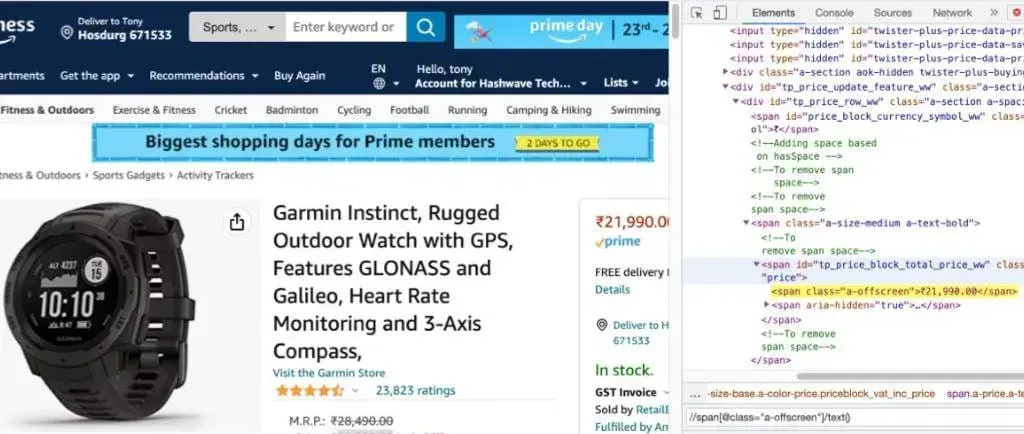
We need to extract the price data and compare it with the master data to see if there is a price drop. We need to apply a few string manipulation techniques to get data in the desired form.
def get_amazon_price(dom):

    try:
        price = dom.xpath('//span[@class="a-offscreen"]/text()')[0]
        price = price.replace(',', '').replace('₹', '').replace('.00', '')
        return int(price)
    except Exception as e:
        price = 'Not Available'
        return None


def get_product_name(dom):
    try:
        name = dom.xpath('//span[@id="productTitle"]/text()')
        [name.strip() for name in name]
        return name[0]
    except Exception as e:
        name = 'Not Available'
        return None
Building the master file by writing the data
We use the pythons csv module to write the scraped data to the master file. The code is shown below.
Few ideas to note.
- The master file has three columns, product name, price, and the product URL
- We iterate through the bucket list and parse information from each URL
- We also add a random time delay, giving a helpful gap between each request.
When you run the code snippets above, you'll be able to see a csv file named master_data.csv generated. You need to run this program only once.
Also Read: 7 eCommerce Data Sources You Must Scrape
Building the Amazon price tracker tool
We have the master data to compare the fresh scraping with. So let's begin writing the second script that extracts data from Amazon and compares it with the data on the master file.
Importing the required libraries
For the tracker script - we need to import two additional libraries, the panda's library and the Twilio library.
import requests
from bs4 import BeautifulSoup
from lxml import etree as et
import pandas as pd
from twilio.rest import Client
import sys
Pandas
Pandas is an open-source python library for data analysis and data manipulation. The package is known for a handy data structure called the pandas DataFrame. Pandas also allow Python developers to quickly deal with tabular data (like spreadsheets) within a Python script. Pandas is a must-learn library if you're planning to build a career in data science.
Twilio
Twilio APIs make it easy to programmatically send SMS notifications. We choose Twilio because it gives free credits, which is enough for us.
Starting the data extraction
We will reuse many of the functions defined above to accomplish the task. The additional function we add is to get the price in the master file corresponding to the URL under scraping.
def get_master_price(url):
    for row in df.itertuples():
        if row.url == url:
            return row.price
    return None
We also define two lists for storing products with a price drop. We will be storing their URL and name.
price_drop_products = []
price_drop_list_url = []
Starting to check the price drops on amazon
We will go through each page, get the current price, compare it against the file in the master data and see if there is a price change of more than 10%. If there is a price change of more than 10%. We will add the products to the lists defined above.
for product_url in amazon_urls:

    response = requests.get(product_url, headers=header)
    soup = BeautifulSoup(response.content, 'html.parser')
    main_dom = et.HTML(str(soup))

    price = get_amazon_price(main_dom)
    product_name = get_product_name(main_dom)
    df = pd.read_csv('new_master_Data.csv')

    if price < get_master_price(product_url):
        change_percentage = round((get_master_price(product_url) - price) * 100 / get_master_price(product_url))

        if change_percentage > 10:
            print(' There is a {}'.format(change_percentage), '% drop in price for {}'.format(product_name))
            print('Click here to purchase {}'.format(product_url))
            price_drop_products.append(product_name)
            price_drop_list_url.append(product_url)
If there is no price drop - we need the program to exit, and we don't need to invoke the Twilio API.
if len(price_drop_products) == 0:
    sys.exit('No Price drop found')
But if there is a change, we need to invoke the Twilio API and send a message. The first thing is to define a message body. This will be the content of our SMS.
messege = "There is a drop in price for {}".format(len(price_drop_products)) + " products." + "Click to purchase"

for items in price_drop_list_url:
    messege = messege + "\n" + items
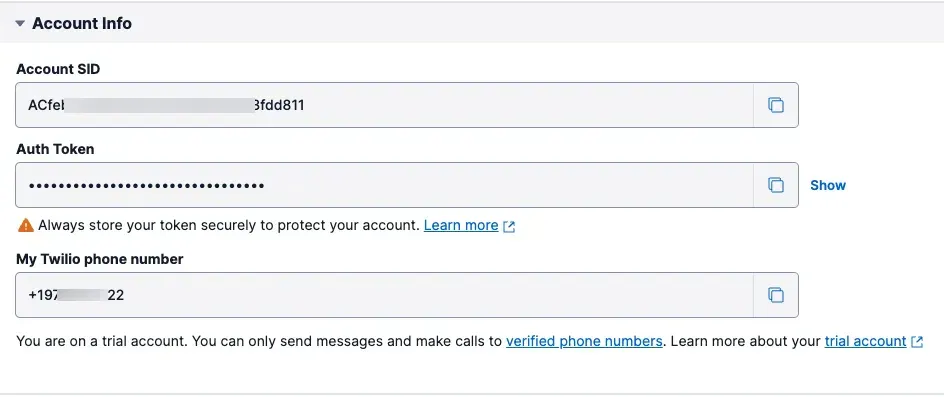
This is what I wrote for my message body, you can use a different message - it is totally customizable. The next step would be signing up for Twilio and getting the Account SID and auth Token. When you signup and log in to the console. This is how it will be
account_sid = 'Add your Account sid here'
auth_token = 'Add your auth token here'

client = Client(account_sid, auth_token)
message = client.messages.create(
    from_='Your twilio phone number',
    body=messege,
    to='Your personal mobile number'
)
Automating the scraper to run every hour
Since I have a full-time job, manually running the program every two hours is not something I'm not cool with. What I want to do is to schedule the program to run every hour.
We can use the python schedule library to do just that. Let us see the code snippet below.
import schedule
import time
from os import system

def job():
    system("python3 Amazon_price_tracker.py")


schedule.every(1).hours.do(job)

while True:
    schedule.run_pending()
    time.sleep(1)
I can just run the script when I start working in the morning, and the scheduling module will run the Amazon price tracking program for me every hour.
Testing the program
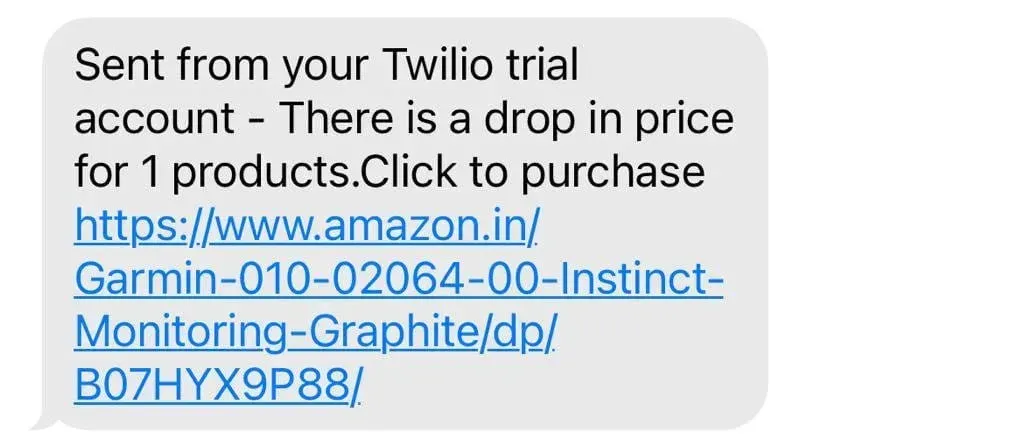
Manually change the price values on the master data file and run the tracker program. You'll see the SMS coming in. If not, some is debugging to do.
I manually changed the master file, and here is the SMS I received.
Download the source code
The code to extract master data
The code to check for prices and send SMS via Twilio.
The code for scheduling the price tracking software to run every hour
Conclusion
This is a good hobby project for those who are learning to program. However, if you have a lot of products to track from Amazon - this script might not work. At scale, amazon data extraction requires IP rotators and a few other techniques to get data. In that case, you need experts like Datahut to get the data for you, contact Datahut today using the chat box on the right side.
FAQ SECTION
1. Is it legal to build an Amazon price tracker using web scraping?
Scraping Amazon’s publicly available product data is a gray area. While it's not illegal in most jurisdictions, it can violate Amazon’s terms of service. Always use responsible scraping practices and monitor legal developments.
2. What Python libraries are best for building a price tracker?
Popular libraries include requests for sending HTTP requests, BeautifulSoup or lxml for parsing HTML, and pandas or openpyxl for saving the data. You may also use smtplib for email alerts.
3. How do I get the current price of a product from Amazon?
You fetch the product page using requests, then parse the HTML to extract the price element using a tool like BeautifulSoup. Be sure to inspect the page structure to identify the correct class or ID.
4. Can I automate the tracker to run daily?
Yes. You can use Python’s schedule or cron jobs on Unix-based systems to run your tracker at regular intervals and send alerts when a price drops.
5. Is there an API for Amazon product data?
Yes, Amazon offers the Product Advertising API, but it requires approval and is limited in scope. Many users opt for web scraping when API access is denied or too restricted.


