


Most Amazon sellers figure out they need a rank tracker after they've already lost ground. A competitor moves up, traffic drops, and they're left guessing which keywords slipped and when. Paid tools like Helium 10 and AMZScout solve this, but they charge $100–$500/month before you've validated whether tracking even moves the needle for your products.
We built a free Amazon keyword rank tracker that covers the core use case: enter a keyword, see the top 10 organic results, and track how those rankings shift across three days. It's the simplest way to get free Amazon keyword ranking data without a paid subscription — no account, no credit card, and the full source code is below if you want to self-host or customize it.
What this tool does
- Shows the top 10 organic products for any keyword on Amazon (sponsored results excluded)
- Works as a free Amazon keyword index checker — if a product doesn't appear in the top 10 for a keyword, it's effectively not indexed for that term
- Tracks rank changes over the previous two days — up, down, new entry, or unchanged
- Functions as an Amazon organic ranking tool, showing natural search position without paid placement noise
- Color-codes rank movements so trends are visible at a glance
- Lets you add and delete keywords without touching the code
- Exports data to CSV
It's built with Python (Playwright for scraping, Streamlit for the UI) and runs locally or on any server.
How it compares to free tiers on paid tools
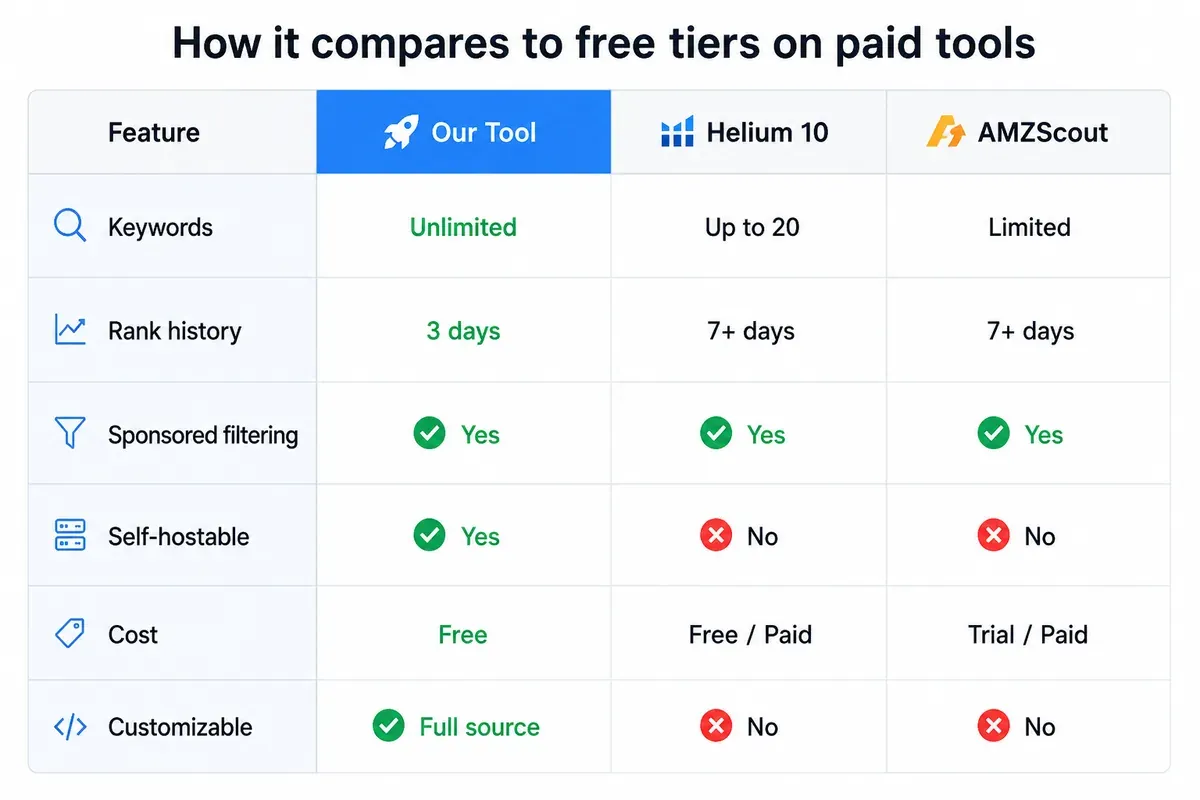
The main trade-off: paid tools store longer rank history and handle Amazon's anti-bot measures better. If you need 30-day trend data or track hundreds of ASINs, a paid tool is worth it. For validating a keyword strategy or monitoring a focused set of categories, this tool is enough.
How the tracker works
The tool has two parts: a scraper that runs daily and a Streamlit frontend that displays the results.
The scraper
Each run opens a headless Firefox browser via Playwright, searches Amazon for each keyword in your list, and records the top 10 organic product names in order. Sponsored results are filtered out before counting — so rank 1 in the output is the first organic result, not the first paid placement. This makes it a reliable free Amazon keyword ranking tracker for organic positions specifically, which is what matters for SEO and listing optimisation.
Data for the current day is written to a CSV named by date. The scraper checks whether today's CSV already exists before running, so it won't re-scrape if triggered twice. Files older than two days are automatically deleted — the tool keeps a rolling 3-day window.
The frontend
The Streamlit app loads on startup and calls the scraper if today's data isn't already collected. From there you can:
- Select a keyword from the dropdown
- Click Submit to see the current top 10 and rank changes versus the previous two days
- Sort by any column, or download the table as CSV
Rank changes are color-coded: green for improvement, red for drop, blue for new entries (products that weren't in the previous day's top 10).
Setting it up
Prerequisites: Python 3.9+, pip, Git
git clone <your-repo-url>
cd amazon-rank-tracker
pip install -r requirements.txt
playwright install firefox
Your requirements.txt needs:
playwright
pandas
streamlit
Running it:
streamlit run app.py
The scraper runs automatically on first load and then once daily via the built-in scheduler.
Adding keywords: use the "Suggest a new keyword" expander in the UI. The single-category scraper runs immediately for that keyword so you see data right away.
The code
Scraper
import os
import asyncio
import pandas as pd
from datetime import datetime, timedelta
from playwright.async_api import async_playwright

BASE_URL = 'https://www.amazon.in/'
BASE_SEARCH_URL = 'https://www.amazon.in/s?k='
CSV_FILE_CURRENT_DAY = './data/' + str(datetime.today().date()) + '.csv'
CSV_FILE_PREVIOUS_DAY = './data/' + str(datetime.today().date() - timedelta(days=1)) + '.csv'
CSV_FILE_PREVIOUS_DAY_2 = './data/' + str(datetime.today().date() - timedelta(days=2)) + '.csv'
KEYWORDS_FILE = "./data/keywords.csv"
KEYWORDS = get_keywords()
CSV_FILE_CURRENT_DAY and its predecessors are set at startup. The scraper uses these to know which file to write to and which to compare against.
Loading keywords
def get_keywords():
    df = pd.read_csv(KEYWORDS_FILE)
    keyword_list = df['Keywords'].tolist()
    return sorted(keyword_list)
Keywords live in a CSV so both the scraper and the frontend read from the same source. Any keyword added through the UI is immediately available to the next scraper run.
Navigating to a keyword's product listing page
async def find_page(page, keyword):
    try:
        search_box_container = await page.wait_for_selector('div[class="nav-search-field "]')
        search_box = await search_box_container.query_selector('input')
        await search_box.fill(keyword)
        await search_box.press('Enter')
    except:
        await page.goto(BASE_SEARCH_URL + keyword, wait_until='load', timeout=100000)
    await page.wait_for_timeout(10000)
    return page
The fallback (page.goto with the search URL) handles cases where Amazon's CAPTCHA blocks access to the search box. In practice, it fires more often at higher scraping frequency.
Filtering sponsored products
async def is_sponsored(product):
    if await product.query_selector(":has-text('Sponsored')"):
        return True
    return False
This checks for the "Sponsored" label before counting a product toward the top 10. Without this filter, paid placements would skew your organic rank data.
Extracting product names
async def scrape_products(page):
    product_list = []
    products = await page.query_selector_all('div[data-cy="title-recipe"]')
    product_count = 0
    for product in products:
        if product_count == 10:
            break
        if await is_sponsored(product):
            continue
        product_name = await get_product_name(product)
        if product_name in product_list:
            continue
        product_list.append(product_name)
        product_count += 1
    return product_list

async def get_product_name(product):
    product_name = await product.query_selector_all('h2')
    name = "".join(await product_name[0].text_content())
    if len(product_name) > 1:
        remaining_name = await product_name[1].text_content()
        if name in remaining_name:
            remaining_name = remaining_name.replace(name, '')
        name += " " + remaining_name
    return name
Some listings split the product name across two <h2> tags (brand in the first, model/description in the second). get_product_name handles the concatenation and deduplication.
Two scraper modes
Multi-category scraper — runs daily for all keywords in the list:
async def multi_category_scraper():
    if check_if_file_exists(CSV_FILE_CURRENT_DAY):
        print("Today's data already collected. Run script tomorrow")
        return

    async with async_playwright() as p:
        browser = await p.firefox.launch(headless=True)
        context = await browser.new_context()
        page = await context.new_page()
        await page.goto(BASE_URL, wait_until='load', timeout=100000)

        product_data = {}
        for keyword in KEYWORDS:
            target_page = await find_page(page, keyword)
            product_list = await scrape_products(target_page)
            product_data[keyword] = product_list

        df = pd.DataFrame(product_data)
        df.to_csv(CSV_FILE_CURRENT_DAY, index=False)

        # Delete files older than 2 days
        old_file = './data/' + str(datetime.today().date() - timedelta(days=3)) + '.csv'
        if os.path.exists(old_file):
            os.remove(old_file)

        await browser.close()
Single-category scraper — triggered when a new keyword is added via the UI:
async def single_category_scraper(keyword):
    file_paths = get_csv_file_paths()
    async with async_playwright() as p:
        browser = await p.firefox.launch(headless=True)
        context = await browser.new_context()
        page = await context.new_page()
        await page.goto(BASE_URL, wait_until='load', timeout=100000)
        target_page = await find_page(page, keyword)
        product_list = await scrape_products(target_page)
        df_current = pd.read_csv(file_paths[0])
        df_current[keyword] = product_list
        df_current.to_csv(file_paths[0], index=False)
        KEYWORDS.append(keyword)
        pd.DataFrame(KEYWORDS, columns=["Keywords"]).to_csv(KEYWORDS_FILE, index=False)
        for filename in (file_paths[1:]):
            try:
                df = pd.read_csv(filename)
                df[keyword] = product_list
                df.to_csv(filename, index=False)
            except:
                df_current.to_csv(filename, index=False)
        await browser.close()
Frontend (Streamlit)
Startup and scheduling
@st.cache_resource
def initialization():
    asyncio.run(multi_category_scraper())
    # Schedule daily re-run
    ...

initialization()
The @st.cache_resource decorator means initialization() only runs once per server session, not on every page load. The scheduler inside calls multi_category_scraper() each day at a fixed time.
Displaying rank data
st.header("Enter the keyword you want to search for")
keyword_select = st.selectbox("Select the keyword", KEYWORDS)
keyword_submit = st.button("Submit Keyword")

if keyword_submit:
    rank_change_1, rank_change_2 = get_total_rank_difference(keyword_select)
    needed_df = pd.DataFrame({
        "RANK": [number for number in range(1, 11)],
        "NAME": df1[keyword_select],
        "RANK_CHANGE_1": rank_change_1,
        "RANK_CHANGE_2": rank_change_2,
    })
    needed_df = needed_df.set_index("RANK")
    st.dataframe(
        needed_df.style.map(set_color, subset=["RANK_CHANGE_1", "RANK_CHANGE_2"]),
        use_container_width=True,
    )
Calculating rank changes
def get_total_rank_difference(keyword):
    file_paths = get_csv_file_paths()
    df1, df2, df3 = pd.read_csv(file_paths[0]), pd.read_csv(file_paths[1]), pd.read_csv(file_paths[2])

    def calculate_rank_difference(current_data, previous_data):
        rank_list = []
        for data in current_data:
            current_rank = current_data.index(data) + 1
            previous_rank = previous_data.get(data, 0)
            diff = previous_rank - current_rank if previous_rank else '+'
            if diff != '+':
                diff = str(diff) if diff <= 0 else '+' + str(diff)
            rank_list.append(diff)
        return rank_list

    current_data = list(df1[keyword])
    previous_data = dict(zip(df2[keyword], df2.index + 1))
    previous_data_2 = dict(zip(df3[keyword], df3.index + 1))

    previous_rank_list = calculate_rank_difference(current_data, previous_data)
    previous_rank_list_2 = calculate_rank_difference(current_data, previous_data_2)
    return previous_rank_list, previous_rank_list_2
The rank difference logic: subtract yesterday's rank from today's. Positive = the product moved up (lower number = better rank on Amazon). A + instead of a number means the product is new to the top 10 today.
Color coding
def set_color(value):
    if value == '+':
        color = 'blue'   # New entry
    elif value[0] == '-':
        color = 'red'    # Rank dropped
    elif value[0] == '+':
        color = 'green'  # Rank improved
    else:
        color = 'white'  # No change
    return 'color: %s' % color
Adding a keyword
with st.expander("Can't find what you're looking for?"):
    suggested_keyword = st.text_input("Enter the keyword you'd like to suggest:")
    submit_suggestion_button = st.button("Submit Suggestion")

    if submit_suggestion_button and suggested_keyword:
        suggested_keyword_lower = suggested_keyword.lower()
        if suggested_keyword_lower in [keyword.lower() for keyword in KEYWORDS]:
            st.error("That keyword is already in the list.")
        else:
            new_keyword = capitalize_first_word(suggested_keyword_lower)
            run_single_category_scraper(new_keyword)
            st.info("Keyword added.")
            st.rerun()
Deleting a keyword
with st.expander("Delete an existing keyword?", expanded=False):
    keyword_for_deletion = st.selectbox("Select the keyword to delete", KEYWORDS, key="delete_keyword")
    st.warning("This action cannot be undone.")
    if st.button("Submit Deletion"):
        delete_keyword(keyword_for_deletion)
        st.info("Keyword deleted.")
        st.rerun()

def delete_keyword(keyword):
    keyword_list = get_keywords()
    keyword_list.remove(keyword)
    df = pd.DataFrame()
    df['Keywords'] = keyword_list
    df.to_csv(KEYWORDS_FILE, index=False)
    data_files = get_csv_file_paths()
    for data_file in data_files:
        df1 = pd.read_csv(data_file)
        df1 = df1.drop(keyword, axis=1)
        df1.to_csv(data_file, index=False)
How Amazon keyword ranking works
Amazon's search algorithm — commonly called A10 — ranks products based on a combination of relevance signals and performance signals. Relevance covers how well your listing matches the search term: keywords in your title, bullet points, backend search terms, and description all feed this. Performance covers how well your listing converts: click-through rate, sales velocity, return rate, and review score all factor in.
The practical implication: organic rank isn't static. A product can move several positions in a day just from a spike in sales or a competitor pulling spend from an ad campaign. Most intra-day rank swings are algorithm noise that resolves within 72–96 hours. This is why daily tracking — which is what this tool does — filters that noise better than hourly tracking would. You see the signal, not the jitter.
What keyword rank tracking tells you that sales data alone doesn't: whether your listing is visible for the keywords you care about. A product can be converting well on its primary keyword while being completely absent from search results for adjacent terms. Tracking rank across a set of keywords shows you where you have coverage and where competitors are taking traffic you don't know you're missing.
The index checker function matters here too. If a product doesn't appear in the top 10 for a keyword across multiple consecutive days, it's either not indexed for that term or ranked too deep to matter. That's the signal to revisit your backend keywords, listing copy, or ad strategy for that term.
Scaling it up
The tool works well for a few dozen keywords. Two problems surface as you scale:
More keywords = longer scrape time. Each keyword requires a browser navigation and a wait for dynamic content. At 10 keywords, a run takes a few minutes. At 100+, it can hit timeouts or take long enough to cause scheduling conflicts. The fix: split keywords into batches and run multiple scraper instances in parallel, with staggered start times to spread the request load. Our web scraping best practices guide covers rate limiting and batching patterns in more detail.
Multiple users sharing one keyword list. Right now, any user can delete any keyword — including ones another user needs. Adding a database layer solves this cleanly: one table for users, one for keywords, and a join table linking them. Each user sees only their keywords. Deletions remove the user-keyword link, and the keyword itself is only removed from the scrape queue when no user references it.
Limitations to know before relying on it
- Amazon's anti-bot detection will block the scraper periodically, especially at higher frequencies. For consistent data, you'll want proxy rotation — something the current version doesn't handle. See also our guide on bypassing anti-scraping tools for techniques that help.
- 3-day window only. The tool keeps a rolling 3-day window. There's no historical archive. For trend analysis beyond that, you'd need to store CSVs externally or add a database.
- Amazon.in only (by default). The
BASE_URLandBASE_SEARCH_URLpoint to the Indian marketplace. Change these constants to switch to amazon.com, amazon.de, etc. - Product name matching. Rank differences are calculated by matching product names as strings. If Amazon changes how a product name displays between days, the tool treats it as a new entry rather than the same product at a different rank.
When to graduate to a paid tool
This tool is a good starting point, but there are situations where paid tools earn their cost:
- You need 30+ days of rank history to identify seasonal patterns
- You're tracking ASINs directly rather than category keywords
- You need reliable uptime without managing proxy rotation yourself
- You're an agency tracking rankings across multiple client accounts
For those cases, Helium 10's paid tiers or AMZScout Pro are worth evaluating. If you're also weighing whether to build further in-house versus buying data outright, our build vs buy guide lays out the decision clearly.
Need Amazon data at scale?
This tracker runs daily. That's fine for monitoring keyword trends, but a lot of Amazon use cases need faster data — pricing that refreshes hourly, inventory levels updated in near real-time, or live feed data for dynamic repricing.
If you're operating at that cadence, or across thousands of products, building and maintaining your own scraper stops making sense fast. Amazon data scraping has real challenges at scale — proxy rotation, CAPTCHA handling, anti-bot updates, data normalization — it's a full-time infrastructure problem that has nothing to do with your actual business. There are also five good reasons not to DIY web scraping projects beyond just the technical overhead.
That's what we do at Datahut. Whether you need daily, hourly, or live Amazon data, we deliver it clean and structured, on your schedule. Get in touch and we'll scope it out.
FAQ
What is an Amazon keyword rank tracker? It monitors where products appear in Amazon search results for specific keywords. Rank 1 means the first organic result; rank 10 is the last on the first page. Tracking this over time tells you whether a product is gaining or losing visibility for a given search term.
Can this be used as an Amazon keyword index checker? Yes. If a product doesn't appear in the top 10 results for a keyword, it isn't indexed for that term in any meaningful way — or it's ranked too low to matter. Run the tool for any keyword and check whether your product (or a competitor's) shows up. If it doesn't appear across multiple days, that keyword isn't working for that listing.
Does this tool work for amazon.com? By default it's configured for amazon.in. Change BASE_URL and BASE_SEARCH_URL to https://www.amazon.com/ and https://www.amazon.com/s?k= respectively. The scraper logic is otherwise identical.
Why does the tool sometimes show no data for a keyword? Amazon's anti-bot system blocked the scraper during that run. The most common fix is adding a longer wait between page loads (page.wait_for_timeout), or running during off-peak hours. Proxy rotation is the more reliable solution at scale. You can also read our breakdown of what makes Amazon scraping so difficult for more context.
Can I track specific ASINs instead of keywords? Not with this version. The tool tracks keyword-level rankings — which products appear for a search term. ASIN-level tracking (monitoring a specific product's rank across many keywords) would require a different data model.
How is this different from Helium 10's free keyword tracker? Helium 10's free tier limits you to 20 keywords and requires an account. This tool has no account requirement, no keyword limit (within what your server can handle), and you can self-host it and modify the code. The trade-off: Helium 10 stores longer history and handles Amazon's anti-bot systems better out of the box.
Want to see more Amazon data projects? We've also built a Python-based Amazon price tracker and a Playwright scraper for Amazon tablet data if you want to extend what you're building here. For a broader view of what Amazon data can reveal, see our Amazon review sentiment analysis guide.


